Turn Windows event logs into a timeline with EvtxECmd
Windows records a lot in its .evtx logs, but Event Viewer is a slow way to read them. EvtxECmd parses the logs into a CSV you can sort, filter and timeline, and its maps pull the useful fields out of each event for you.
Get EvtxECmd
EvtxECmd is another of Eric Zimmerman's free tools, and it ships with its maps. Download it from ericzimmerman.github.io. See Tools & setup for the rest.
Parse a log to CSV
One log at a time:
EvtxECmd.exe -f Security.evtx --csv . --csvf security.csv
Or a whole folder:
EvtxECmd.exe -d "C:\evidence\winevt\Logs" --csv . --csvf all.csv
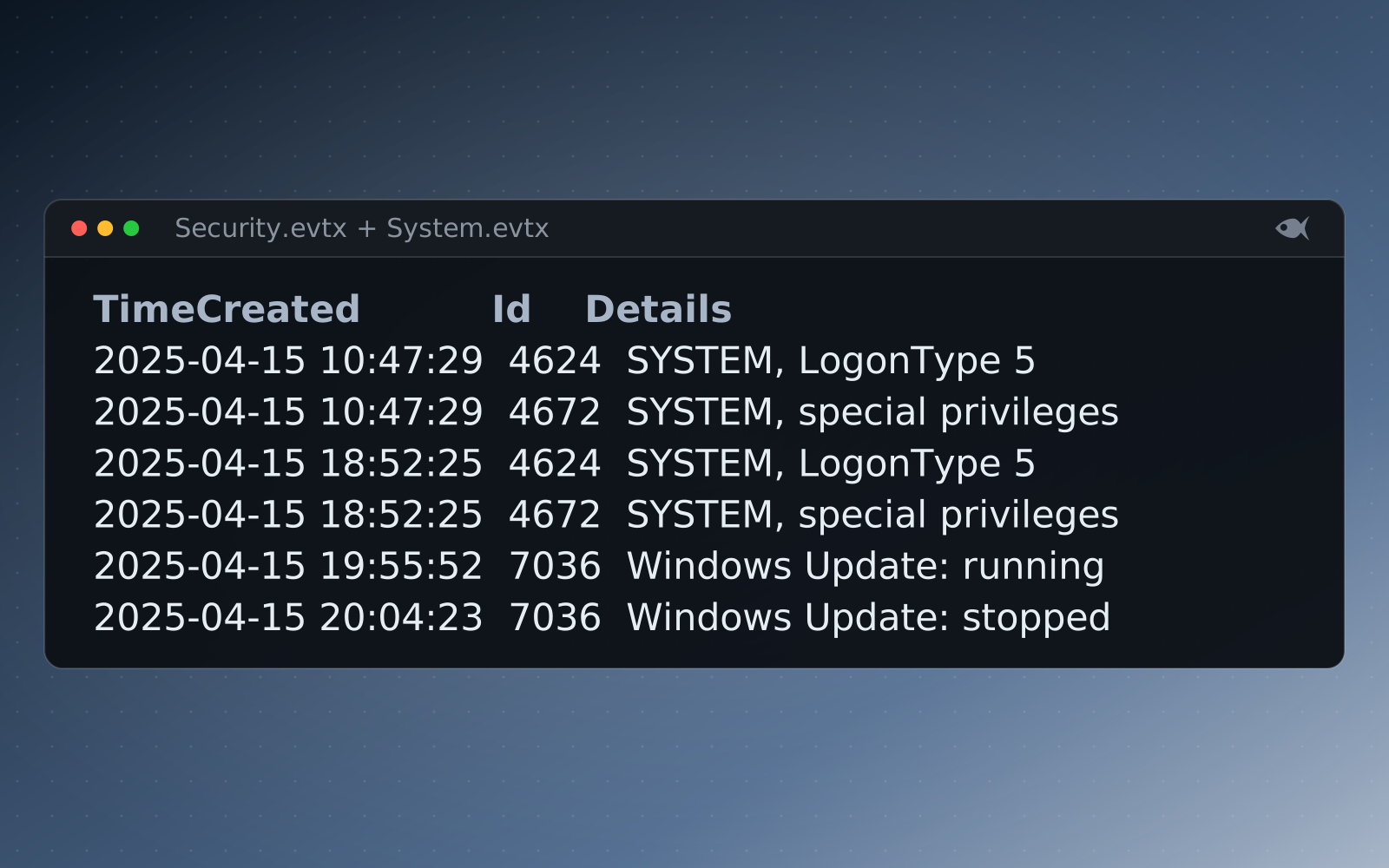
The sample lab includes Security.evtx and System.evtx to try this on.
Open it in Timeline Explorer
Load the CSV in Timeline Explorer, also from Eric Zimmerman. You can sort by time, filter by Event ID, and pin the rows you care about, which beats clicking through Event Viewer one line at a time.
Event IDs worth knowing
- 4624 / 4625: a logon that succeeded or failed. Check the Logon Type (3 is network, 10 is RDP).
- 4688: a process started, with the command line if auditing is on.
- 4720: an account was created. 4728 / 4732: an account was added to a group.
- 7045: a service was installed, which is a common persistence step.
- 1102: the Security log was cleared.
Let the maps help
EvtxECmd's maps pull the useful fields out of each event's payload, so you get named columns instead of raw XML. One thing to keep straight on a Security event: SubjectUserName is who did it, and TargetUserName is who it was done to. Getting those backwards is the most common mistake we see when grading.
<Event xmlns="http://schemas.microsoft.com/win/2004/08/events/event"><System><Provider Name="Microsoft-Windows-Security-Auditing" Guid="{54849625-5478-4994-a5ba-3e3b0328c30d}" EventSourceName=""></Provider>
<EventID Qualifiers="">4624</EventID>
...
<TimeCreated SystemTime="2025-01-24 16:03:54.726151+00:00"></TimeCreated>
<EventRecordID>6</EventRecordID>
...
<Channel>Security</Channel>
<Computer>GRANIT-SRV69.graniteenergy.net</Computer>
...
<EventData><Data Name="SubjectUserSid">S-1-5-18</Data>
<Data Name="SubjectUserName">GRANIT-SRV69$</Data>
<Data Name="SubjectDomainName">GRANITEENERGY</Data>
<Data Name="SubjectLogonId">0x3e7</Data>
<Data Name="TargetUserSid">S-1-5-18</Data>
<Data Name="TargetUserName">SYSTEM</Data>
<Data Name="TargetDomainName">NT AUTHORITY</Data>
<Data Name="TargetLogonId">0x3e7</Data>
<Data Name="LogonType">5</Data>
...
<Data Name="ProcessName">C:\Windows\System32\services.exe</Data>
<Data Name="IpAddress">-</Data>
...How it fits a Red Herrings case
Our event-log cases are written as real binary EVTX, so EvtxECmd reads them the same way it reads a live system's logs. For a worked example that chains logons to the processes they spawned, see detecting lateral movement in Windows event logs.
Run the free First Look cases or download the sample lab, or start the 30-day trial with sample cases to try, and generate a per-student case.