Group Policy Operational log: event IDs 4006, 5308 and 5312
Microsoft-Windows-GroupPolicy/Operational records every boot, sign-in and background refresh on a domain member, with the domain controller it reached and the GPOs it applied. Read it for uptime, network location and policy changes.
On a Windows domain member, Security.evtx and System.evtx get opened first and Microsoft-Windows-GroupPolicy%4Operational.evtx often doesn't get opened at all. That's a mistake. The Group Policy Client service writes to it at every boot, every interactive sign-in and every background refresh, and each run records the domain controller it reached, how fast the link was and which GPOs applied. Read in order, it's a heartbeat: proof the machine was on and on the network, at intervals you can predict.
The records below come from a domain member in a lab generated for this post, read with python-evtx. The names are fictional.
Where it is and when it's written
The file is C:\Windows\System32\winevt\Logs\Microsoft-Windows-GroupPolicy%4Operational.evtx, written by the provider Microsoft-Windows-GroupPolicy from the Group Policy Client service (gpsvc). A member computer processes policy at boot, processes user policy at each interactive sign-in, and refreshes both in the background every 90 minutes plus a random 0 to 30 (Microsoft's default; domain controllers refresh every 5 minutes). An administrator's gpupdate is a fourth kind of run.
Each run opens with a start event and closes with its success event:
- 4000 to 8000: computer policy at boot.
- 4001 to 8001: user policy at sign-in.
- 4004 to 8004 and 4005 to 8005: a manual refresh (
gpupdate), computer and user. - 4006 to 8006 and 4007 to 8007: the background refresh, computer and user.
A run that fails ends in the 7000s instead (7000 to 7007, same order), with an error code. Every record inside one run carries the same ActivityID in its System section, so filtering on it gives you one run start to finish.
Inside a run
Between the start and the end, a domain member writes the same handful of records each time:
- 5308: the domain controller it found, name and IP, both written with a leading
\\. - 5326: how long discovering that DC took, in milliseconds.
- 5314 and 5327: the measured bandwidth and whether Windows called it a slow link.
- 5310: the account the run is for (the computer's or the user's distinguished name) and its domain.
- 5312: the GPOs that apply, as an XML list with each GPO's GUID, name, version, scope of management (the domain or OU it's linked to) and SYSVOL path.
- 5313: the GPOs filtered out, with the reason.
- 4016 and 5016: each client-side extension (Security, Scripts, Registry and so on) starting and finishing, with its run time.
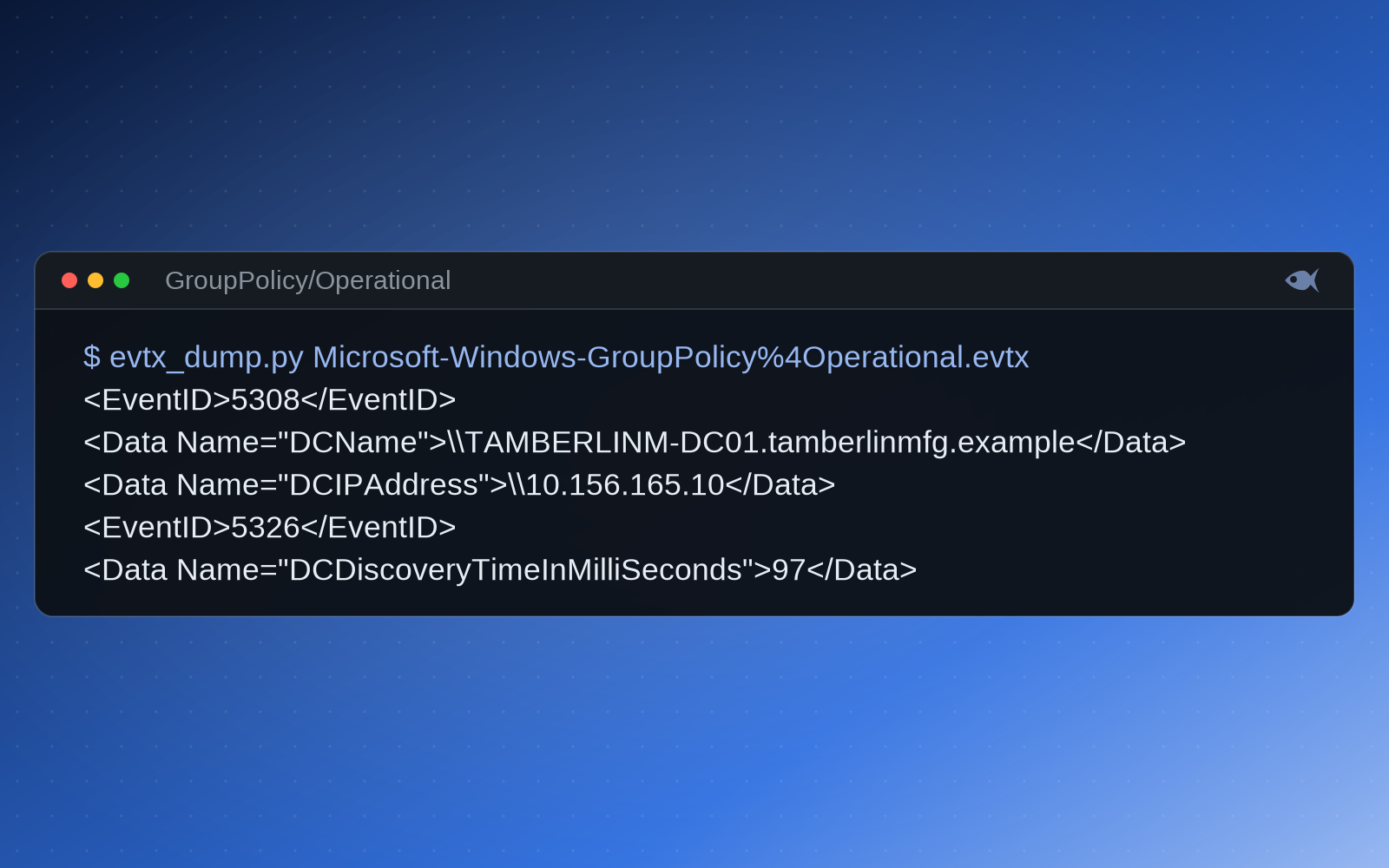
<EventID>5308</EventID>
...
<Data Name="DCName">\\TAMBERLINM-DC01.tamberlinmfg.example</Data>
<Data Name="DCIPAddress">\\10.156.165.10</Data>

<EventID>5326</EventID>
...
<Data Name="DCDiscoveryTimeInMilliSeconds">97</Data><EventID>5312</EventID>
...
<Data Name="DescriptionString">Default Domain Policy</Data>
<Data Name="GPOInfoList"><GPO ID="{31B2F340-016D-11D2-945F-00C04FB984F9}">
<Name>Default Domain Policy</Name><Version>8</Version>
<SOM>LDAP://DC=tamberlinmfg,DC=example</SOM>
<FSPath>\\tamberlinmfg.example\SysVol\tamberlinmfg.example\Policies\{31B2F340-016D-11D2-945F-00C04FB984F9}\Machine</FSPath>
</GPO></Data>What it tells you
When the machine was up and connected. Background refreshes (4006 and 8006) come every 90 to 120 minutes while the computer is on and can reach a DC. A gap longer than that means it was off, asleep or off the network. Line the runs up with the System log's boots and shutdowns (6005, 6006, 1074) and you can say what the user's laptop was doing on a day the Security log rolled over.
Where it was. 5308 names the domain controller and its address. A laptop that reaches a branch-office DC, or reports a slow link in 5314, was somewhere other than its desk. A run that can't find a DC at all, the usual case at home without a VPN, ends with an error instead of a success event.
Who signed in. A user run (4001 to 8001) names the account in PrincipalSamName as DOMAIN\user. It's a second, independent record of an interactive sign-in to set beside the Security log's 4624.
Policy that changed. 5312 lists every GPO with its version. A GPO that appears for the first time, or a version that jumps shortly before an incident, points at someone editing policy, the way ransomware operators push a scheduled task or a startup script to every machine in a domain (MITRE ATT&CK T1484.001, Group Policy Modification). Take the GUID and FSPath to the domain's SYSVOL to see what the GPO does, and, if directory service change auditing is on, to the domain controllers' 5136 events to see who changed it.
The version is two counters in one number, as MS-GPOL defines it: the user part in the high 16 bits and the computer part in the low 16. Each edit to a half bumps that half.
$ sqlite3 -header -column :memory: \
  "SELECT 65544 AS version, 65544 >> 16 AS user_edits, 65544 & 65535 AS computer_edits;"
version  user_edits  computer_edits
-------  ----------  --------------
65544 1 8Reading it
Event Viewer opens the file with Open Saved Log, and EvtxECmd parses it to CSV like any other channel. For one event across a whole log, PowerShell's Get-WinEvent takes the file path in its filter:
Get-WinEvent -FilterHashtable @{Path='.\Microsoft-Windows-GroupPolicy%4Operational.evtx'; Id=4006,8006} |
    Select-Object TimeCreated, Id, Message | Sort-Object TimeCreated
Sort the 4006 times and look at the gaps. Then pull every 5308 and list the distinct DC addresses, and every 5312 and list the distinct GPO names and versions. Three lists, a few minutes' work, and you know the machine's rhythm, its networks and its policy history.
The log is a fixed-size ring: once it's full, the oldest records go. On a domain member that refreshes all day, that's weeks of history, not months, so collect it early.
In the Windows cases
Every Windows host in Red Herrings ships its Group Policy Operational log beside Security, System, Application and Defender's Operational log. Boot and sign-in runs line up with the System and Security logs' own boot cycles and logons, domain members record DC discovery, link speed and their GPO lists, and the background refresh keeps its 90-minute rhythm while the host is up. Each student's host, domain, controller and times are their own.
The First Look cases are free, and a 30-day trial adds a medium and a hard case in each discipline. It runs on your machine and generates a different Windows host for every student.