Reading an iPhone sms.db: the iMessage joins and the Cocoa-time trap
An iPhone keeps its messages in a single SQLite file. Getting a readable thread out of it means joining four tables correctly and decoding a timestamp that's neither Unix seconds nor anything most tools guess right the first time.
Mobile forensics is where a lot of students meet their first real database. On an iPhone, the Messages app stores everything in sms.db, a standard SQLite file that lives at /private/var/mobile/Library/SMS/sms.db in a full file-system extraction. Open it in DB Browser for SQLite and you can read every table by hand. That's why it makes a good teaching artifact: nothing is locked behind a proprietary parser, so a student has to understand the schema rather than trust a tool's export.
It's also where two specific skills get tested at once. First, a message isn't stored in one place: the text, the sender, the conversation and the ordering live in different tables that you have to join. Second, the timestamp is Apple's own epoch, and reading it as Unix time gives an answer that's wrong by thirty-one years. Both are worth teaching deliberately, because both show up on the job and on the mobile certification exams.
The schema, in the order you need it
Four tables carry the conversation, and each answers a different question:
messageis the body. One row per message, withtext,date,is_from_me(1 if the phone's owner sent it, 0 if they received it),service(iMessage or SMS), and ahandle_idthat points at the other party.handleis the address book of the conversation. Each row is one remote identity, withidholding the phone number in E.164 form or the Apple ID email.message.handle_idjoins tohandle.ROWID.chatis the thread itself, one row per conversation, withchat_identifierand an optionaldisplay_namefor group chats.chat_message_joinis the bridge. A message doesn't name its chat directly; this table mapschat_idtomessage_id, and it's the piece students most often forget.
That last table is the crux. A beginner who selects straight from message gets a flat pile of texts with no sense of which conversation each belongs to, and in a group chat they can't tell who said what. The join through chat_message_join is what turns the pile back into threads:
SELECT  datetime(m.date/1000000000 + 978307200, 'unixepoch') AS sent_utc,
        CASE m.is_from_me WHEN 1 THEN 'owner' ELSE h.id END   AS sender,
        m.service,
        m.text
FROM        message m
JOIN        chat_message_join cmj ON cmj.message_id = m.ROWID
JOIN        chat c                ON c.ROWID        = cmj.chat_id
LEFT JOIN   handle h              ON h.ROWID        = m.handle_id
WHERE   c.chat_identifier = '+15551234567'
ORDER BY m.date;
The LEFT JOIN on handle matters: an outbound message can have a handle_id of 0, so an inner join quietly drops every message the owner sent. Students who use an inner join here produce a transcript that's missing one side of the conversation, which is a subtle and very teachable mistake.
The Cocoa-time trap
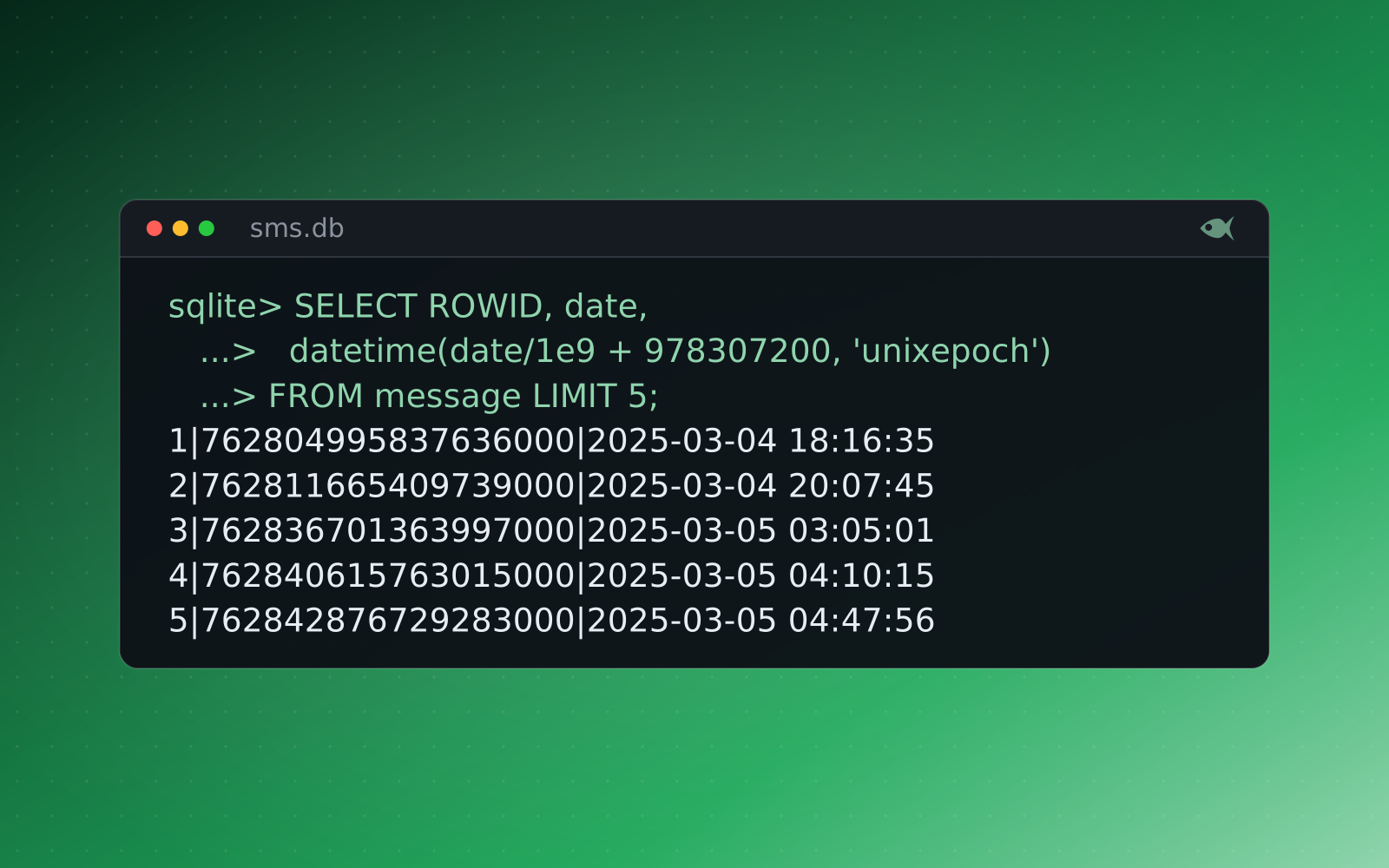
Now the timestamp. On a modern iPhone, message.date isn't Unix time. It's Apple's Cocoa Core Data timestamp: the number of nanoseconds since the Mac reference epoch of 2001-01-01 00:00:00 UTC. A single message date looks like 743800000000000000, a number big enough that students assume it's already in milliseconds, or microseconds, and start dividing by guesses.
Read an iPhone message date as Unix nanoseconds and you land 31 years early, in the 1990s. Read it as Unix microseconds and you land tens of thousands of years in the future. The value is right there; the epoch is the whole exam.
The correct decode has two steps. Divide by one billion to get seconds, then add 978307200, the number of seconds between the Unix epoch of 1970 and the Mac epoch of 2001, to shift it onto Unix time. In SQLite that's the datetime(m.date/1000000000 + 978307200, 'unixepoch') expression above. The same transform applies to date_read and date_delivered, which lets a student prove when a message was sent and when it was read.
$ sqlite3 -header -column -nullvalue NULL :memory: "SELECT 743800000000000000 AS raw,
  datetime(743800000000000000/1000000000, 'unixepoch') AS as_unix_ns,
  datetime(743800000000000000/1000000, 'unixepoch') AS as_unix_us,
  datetime(743800000000000000/1000000000 + 978307200, 'unixepoch') AS as_cocoa_ns;"
raw                 as_unix_ns           as_unix_us  as_cocoa_ns
------------------  -------------------  ----------  -------------------
743800000000000000 1993-07-27 19:06:40 NULL 2024-07-27 19:06:40There's a historical wrinkle worth mentioning to a class: before iOS 11, message.date was stored in seconds since 2001, not nanoseconds. A student who finds a nine- or ten-digit date rather than an eighteen-digit one is looking at an older device, and the divide-by-a-billion step would push them back to 2001. Teaching the two formats side by side makes the point that a timestamp means nothing without its epoch and its unit.
Putting a name to a number
A phone number is an identifier, not a person. The second database in the extraction, AddressBook.sqlitedb, is where you resolve it: ABPerson holds the contact records and ABMultiValue holds their phone numbers and emails, so joining the handle.id from sms.db against the stored numbers turns +15551234567 into a named contact. That cross-database correlation is the step that converts a raw thread into an investigative finding: this contact, under this saved name, sent this message at this time.
Students who prefer a guided tool can run the same extraction through iLEAPP, which parses sms.db and the address book into an HTML report with the timestamps already decoded. The teachable sequence is to have them answer the question by hand in DB Browser first, then confirm it in iLEAPP, so the automated parser is a check on their reasoning rather than a substitute for it. That's also how a real examiner validates a tool's output before putting it in a report.
A different thread for every student
The iPhone cases in Red Herrings plant a genuine sms.db with the real message, handle, chat and chat_message_join structure, alongside an AddressBook.sqlitedb, so students work the actual schema in the actual tools rather than a flattened export. And because every case is individually seeded, each student's phone has its own contacts, phone numbers, group membership, message text and timestamps. Ask "when did the suspect first message the burner number, in UTC?" and every student has to run their own join and their own Cocoa-time decode to reach their own answer. A copied timestamp is the wrong timestamp, because it belongs to someone else's phone.
Every generated variant is re-solved and verified before release by the verification check, an independent parser pass that opens the student's own sms.db, performs the joins and decodes the dates, so the answer key is provably correct against the exact database each student receives. The iPhone family sits in the mobile forensics pathway alongside the Android cases, mapped to the GASF objectives and useful preparation for the Cellebrite and Magnet vendor exams.
The First Look cases are free, and a 30-day trial adds a set of sample cases. It runs on your machine, and you can generate a per-student iOS case with its own messages, contacts and timestamps.