Linux wtmp, btmp and lastlog forensics with last and utmpdump
Every SSH login to a Linux server leaves binary records in three files, and the tools that read them are already installed. Each answers a different question: who got in and for how long, who failed, and when each account last logged in.
On a Linux server an SSH login is written twice: as text lines in auth.log (secure on Red Hat) and as fixed-size binary records that the login path writes through the utmp API. Students tend to grep the text log and stop. The binary records are how you check that story. They keep the end of each session as well as the start, they count failed attempts separately, and an intruder who edits auth.log often forgets them.
The output below comes from small sample files written for this post, with made-up accounts and documentation addresses, read with the tools from util-linux 2.39 and shadow 4.13 on Ubuntu 24.04.
Three files, three questions
/var/log/wtmp: every login and logout, plus boots and runlevel changes. Read it withlast./var/log/btmp: failed logins. Read it withlastb. Only root and the utmp group can read it, because a failed username is sometimes a password typed into the wrong prompt./var/log/lastlog: one slot per user ID with that account's most recent login. Read it withlastlog./run/utmp: who's logged in right now, aswhoandwshow it. It lives on a tmpfs, so a disk image doesn't have it. You get it only from a live collection.
All of them are arrays of C structs: 384-byte struct utmp records on x86-64 Linux and 292-byte struct lastlog slots. strings finds the names and addresses but none of the times, so use the parsers. Point them at the copies from the image (-f, or -R for lastlog), never at the analysis machine's own files, and set TZ=UTC: they print times in the zone of the machine that runs them.
last: sessions from wtmp
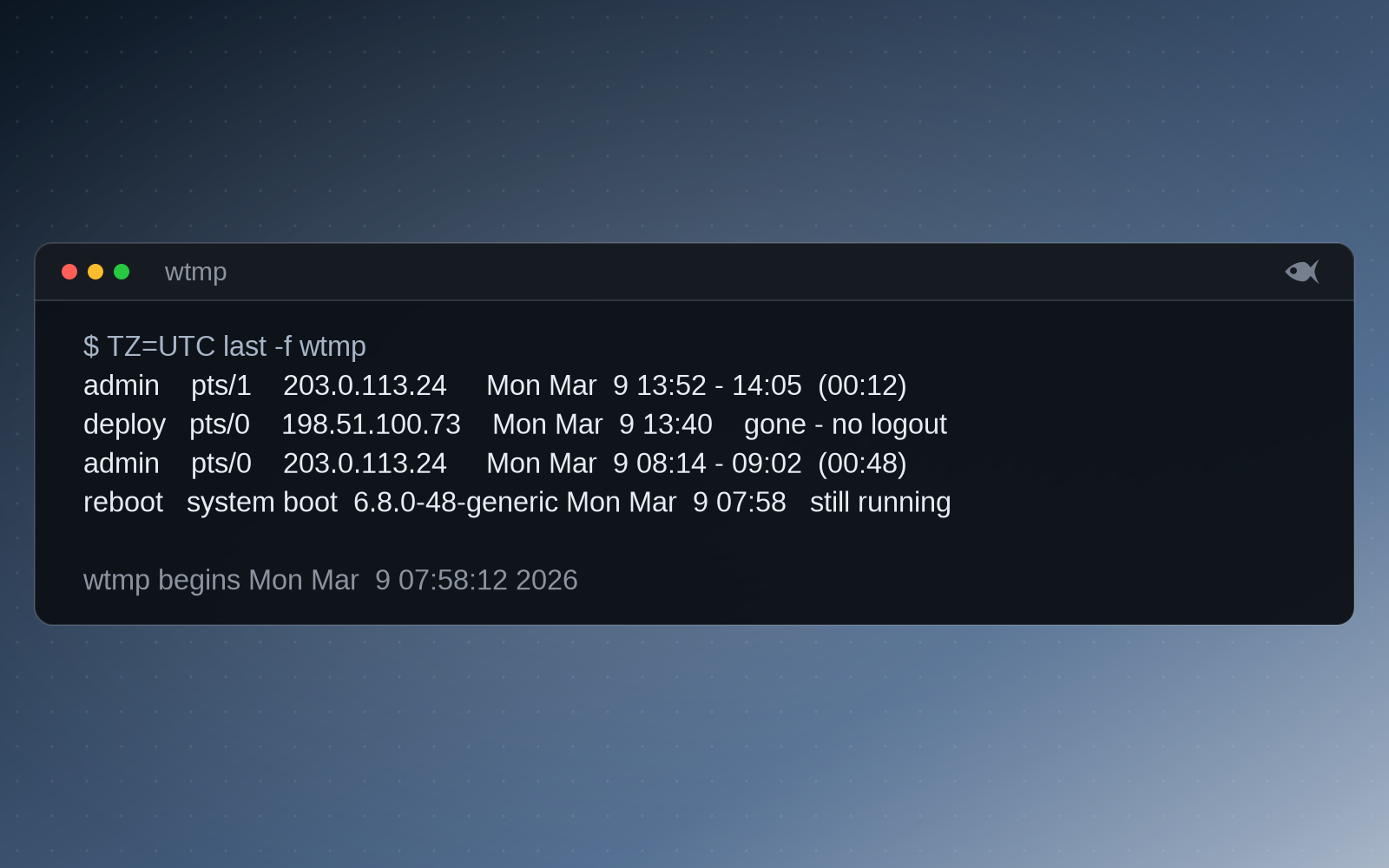
$ TZ=UTC last -F -f wtmp
admin    pts/1        203.0.113.24     Mon Mar  9 13:52:30 2026 - Mon Mar  9 14:05:16 2026  (00:12)
deploy   pts/0        198.51.100.73    Mon Mar  9 13:40:11 2026   gone - no logout
admin    pts/0        203.0.113.24     Mon Mar  9 08:14:03 2026 - Mon Mar  9 09:02:47 2026  (00:48)
reboot   system boot  6.8.0-48-generic Mon Mar  9 07:58:12 2026   still running

wtmp begins Mon Mar 9 07:58:12 2026last pairs each login record (type 7, USER_PROCESS) with the next logout record (type 8, DEAD_PROCESS) on the same terminal line, then prints the span and the duration. Three things to teach:
- Always pass
-F. Without itlastprintsMon Mar 9 13:52 - 14:05: no seconds and no year. An answer to the minute is a wrong answer to a timestamp question. gone - no logoutmeans wtmp holds no logout for that login. The session may still be open (check/run/utmpif you have it), the host may have lost power, or someone removed the record.- The host column is what sshd wrote: the client address, because
UseDNSis off by default.-iforces addresses, and-xadds the shutdown and runlevel entries.
The reboot pseudo-user marks each boot (type 2, BOOT_TIME) with the kernel version in the host column. still running on that line means no shutdown record came after it, and a host that loses power never writes one.
lastb: failed logins from btmp
$ TZ=UTC lastb -f btmp
admin    ssh:notty    192.0.2.150      Mon Mar  9 02:11 - 02:11  (00:00)
test     ssh:notty    192.0.2.150      Mon Mar  9 02:11 - 02:11  (00:00)
oracle   ssh:notty    192.0.2.150      Mon Mar  9 02:11 - 02:11  (00:00)
admin    ssh:notty    192.0.2.150      Mon Mar  9 02:11 - 02:11  (00:00)

btmp begins Mon Mar 9 02:11:40 2026sshd writes a btmp record for each failed password or keyboard-interactive attempt (a rejected key isn't recorded), with the name the client offered and ssh:notty as the line. The name is recorded even when no such account exists, so oracle and test seconds apart from one address read as a password spray. The duration column means nothing here. The finding is the same address turning up later in wtmp with a successful login.
lastlog: the last login per account
$ TZ=UTC lastlog -R /cases/web01/root
Username         Port     From                                       Latest
root                                                                **Never logged in**
admin            pts/1    203.0.113.24                              Mon Mar  9 13:52:30 +0000 2026
deploy           pts/0    198.51.100.73                             Mon Mar  9 13:40:11 +0000 2026
backup                                                              **Never logged in**
lastlog isn't a log. It's a sparse file with one 292-byte slot per UID, at offset UID × 292, overwritten at every login. It answers one question, when this account last got in and from where, and it still answers it after wtmp has been rotated away. It takes account names from /etc/passwd, so point it at the extracted root with -R (it chroots there, which needs root). Its size is 292 times one more than the highest UID that ever got a slot, and the unused slots are holes, so ls -l can show a large file that uses a few blocks on disk.
**Never logged in** for an account that wtmp shows logging in is a contradiction worth chasing: the slot was zeroed, or that login didn't go through a path that writes lastlog. sshd and login write it; su and cron don't.
Newer distributions are replacing these formats with lastlog2 and wtmpdb, SQLite databases with 64-bit times (the 32-bit time fields in struct utmp and struct lastlog run out in 2038). Check which one the host had before you go looking for the files.
utmpdump: every field, and the tampering check
$ utmpdump wtmp
Utmp dump of wtmp
[2] [00000] [~~  ] [reboot  ] [~           ] [6.8.0-48-generic    ] [0.0.0.0        ] [2026-03-09T07:58:12,412031+00:00]
[1] [00053] [~~  ] [runlevel] [~           ] [6.8.0-48-generic    ] [0.0.0.0        ] [2026-03-09T07:58:19,088214+00:00]
[7] [01412] [ts/0] [admin   ] [pts/0       ] [203.0.113.24        ] [203.0.113.24   ] [2026-03-09T08:14:03,551902+00:00]
[8] [01412] [    ] [        ] [pts/0       ] [                    ] [0.0.0.0        ] [2026-03-09T09:02:47,120477+00:00]
[7] [02290] [ts/0] [deploy  ] [pts/0       ] [198.51.100.73       ] [198.51.100.73  ] [2026-03-09T13:40:11,030954+00:00]
[7] [02361] [ts/1] [admin   ] [pts/1       ] [203.0.113.24        ] [203.0.113.24   ] [2026-03-09T13:52:30,774018+00:00]
[8] [02361] [ ] [ ] [pts/1 ] [ ] [0.0.0.0 ] [2026-03-09T14:05:16,009338+00:00]utmpdump prints each record raw. The types you'll meet are 1 (runlevel), 2 (boot), 6 (a login prompt, and btmp's failures), 7 (a login) and 8 (a logout). The microseconds are what you line up against the text logs.
It also works backwards: utmpdump -r turns edited text into a binary file, which is how a careful intruder drops one session and keeps the rest. Signs of that, or of a tool that zeroes records:
- records out of time order;
- a type 0 record with every field empty, where an entry was blanked;
- an
Acceptedline in auth.log with no wtmp login at that second, or a wtmp login with noAcceptedline; - a file modification time later than the file's newest record.
Check every session against auth.log
A wtmp login and its auth.log lines describe one event. sshd's Accepted publickey for admin from 203.0.113.24 port 52144 ssh2, then pam_unix(sshd:session): session opened, then systemd-logind's New session, all within a fraction of a second and with the same user and address. The wtmp record adds the terminal and, with its logout, the session's end, which auth.log gives you only as a session closed line. Match them one to one. A session in one and not the other is where the investigation goes next.
In the Linux cases
The Linux cases in Red Herrings ship wtmp, btmp, utmp and lastlog beside auth.log and syslog, written the way an Ubuntu host writes them: boot and runlevel records, one record per SSH session with its terminal and address, failed attempts in btmp, and lastlog slots that agree with each account's last login. last, lastb, lastlog and utmpdump read them as they would on the server. Every student gets different accounts, addresses and times, and every answer is checked against that student's own files before release.
The First Look cases are free, and a 30-day trial adds a medium and a hard case in each discipline. It runs on your machine and generates a different host for every student.