Android contacts2.db forensics: SQL queries and deleted contacts
Android keeps the address book in contacts2.db: every saved name and number, the account it syncs to, its groups and the contacts deleted but not yet synced. Read it from raw_contacts with data joined through mimetypes, and ignore last_time_contacted, which Android 10 and later leave at 0.
An Android phone keeps its address book in contacts2.db, the contacts provider's SQLite database: names, numbers, accounts, groups, and contacts deleted but not yet synced. It no longer keeps a usable "last contacted" time, the column students reach for first.
The examples come from a lab generated for this post (a Pixel 7a on Android 13), read with sqlite3 3.45.1. The names and numbers are fictional.
Where it is
In a full file system extraction it's /data/data/com.android.providers.contacts/databases/contacts2.db, beside calllog.db, with -wal and -shm files. SQLite's documentation says committed transactions can be lost without the WAL, and that the last connection to close checkpoints the WAL and deletes it. Open a copy of all three. Below, main-only/ holds the database alone:
$ ls -1 copy/
contacts2.db
contacts2.db-shm
contacts2.db-wal
$ sqlite3 main-only/contacts2.db "SELECT _id, version FROM raw_contacts WHERE _id = 34;"
34|3
$ sqlite3 copy/contacts2.db "SELECT _id, version FROM raw_contacts WHERE _id = 34;"
34|4
$ ls -1 copy/
contacts2.dbThe tables that matter
raw_contacts: one row per person per account, withaccount_idpointing ataccounts(a Google account is typecom.google, named by its Gmail address) and thedeletedflag.contacts: one row per aggregate, the person the Contacts app shows. Matching raw contacts share onecontacts._idin theircontact_id.data: one row per detail, tied to a raw contact byraw_contact_id. Whatdata1todata15mean depends onmimetype_id, whichmimetypesresolves.groups: the account's groups, joined through membership rows indata.
$ sqlite3 -header -column contacts2.db "SELECT _id, mimetype FROM mimetypes;"
_id  mimetype
---  -----------------------------------------
1    vnd.android.cursor.item/email_v2
2    vnd.android.cursor.item/im
3    vnd.android.cursor.item/nickname
4    vnd.android.cursor.item/organization
5    vnd.android.cursor.item/phone_v2
6    vnd.android.cursor.item/sip_address
7    vnd.android.cursor.item/name
8    vnd.android.cursor.item/postal-address_v2
9    vnd.android.cursor.item/identity
10   vnd.android.cursor.item/photo
11   vnd.android.cursor.item/group_membership
12   vnd.android.cursor.item/note
13   vnd.android.cursor.item/contact_event
14   vnd.android.cursor.item/website
15   vnd.android.cursor.item/relation
16 vnd.com.google.cursor.item/contact_miscPer AOSP's ContactsContract reference, a name row has the display, given and family names in data1 to data3. A phone_v2 row has the number as the user entered it in data1, its type in data2 (2 is mobile) and the E.164 form in data4. An email_v2 row has the address in data1, and a group_membership row the group's _id. The ids follow first use, and apps add their own types after these, so join on the string.
Building the contact list
Start from raw_contacts. A deleted raw contact leaves its aggregate, so a query that starts from contacts never sees it. Left-join the rest and pivot the data rows by mimetype:
SELECT    r._id AS raw_id, r.contact_id, r.display_name, a.account_type,
          group_concat(CASE WHEN m.mimetype = 'vnd.android.cursor.item/phone_v2'
                            THEN d.data1 END, '; ') AS phones,
          group_concat(CASE WHEN m.mimetype = 'vnd.android.cursor.item/email_v2'
                            THEN d.data1 END, '; ') AS emails,
          r.deleted,
          datetime(c.contact_last_updated_timestamp / 1000, 'unixepoch') AS updated_utc
FROM      raw_contacts r
LEFT JOIN accounts a  ON a._id = r.account_id
LEFT JOIN contacts c  ON c._id = r.contact_id
LEFT JOIN data d      ON d.raw_contact_id = r._id
LEFT JOIN mimetypes m ON m._id = d.mimetype_id
GROUP BY  r._id
ORDER BY  r._id
LIMIT 3;
$ sqlite3 -header -column contacts2.db < contacts.sql
raw_id contact_id display_name account_type phones emails deleted updated_utc
------ ---------- --------------- ------------ ------------ ------ ------- -------------------
1 1 Amara Chen com.google +13305550182 0 2024-06-04 16:37:37
2 2 Taylor Nakamura com.google +12135550154 0 2024-06-19 16:10:05
3 3 Ana Owens com.google +17635550105 0 2024-06-29 11:51:10To match a number from calllog.db or mmssms.db, try data4 too: data1 is however the user typed it.
Google's groups
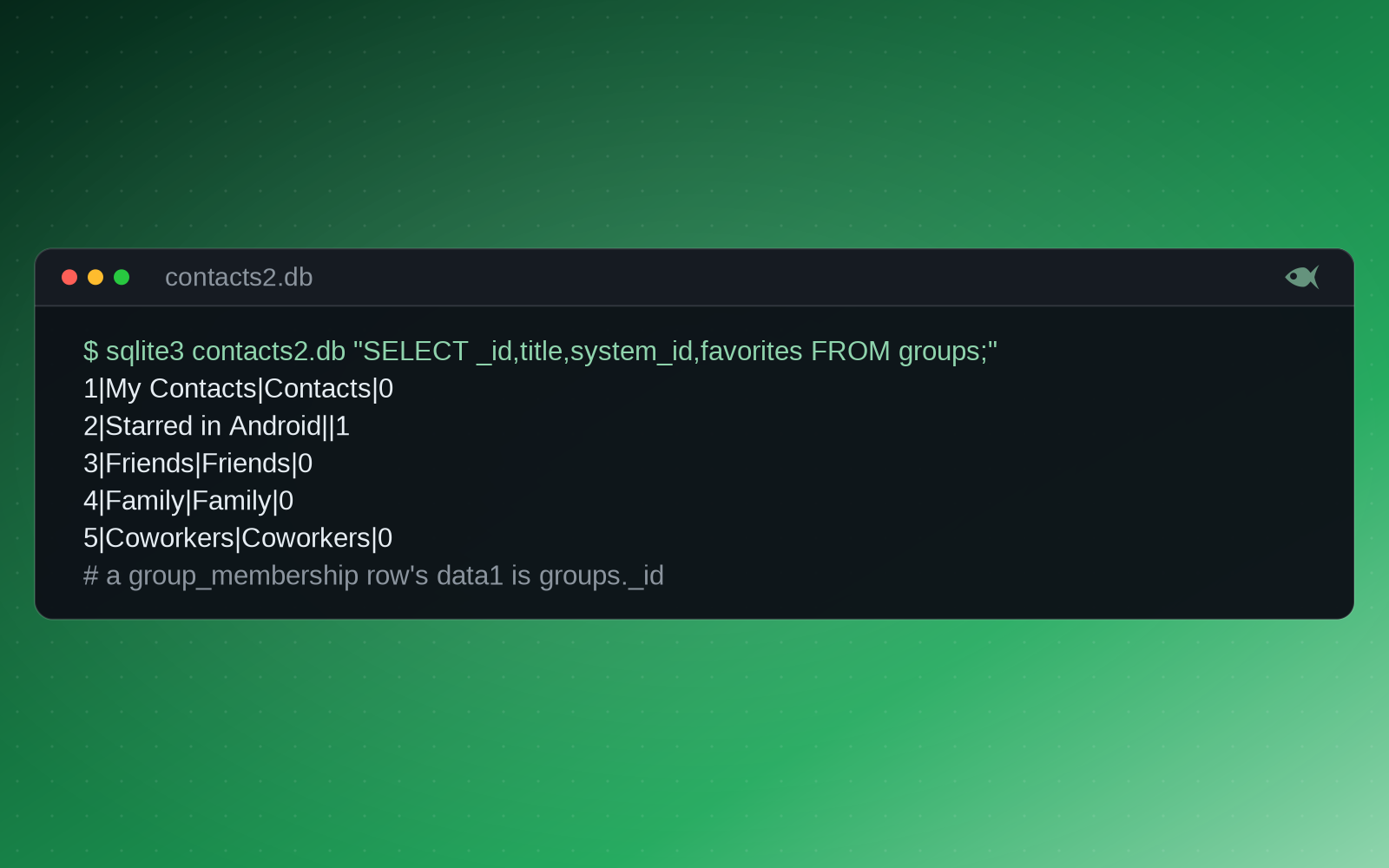
Red Herrings' 1.18 changelog records five groups on the Google account in Digital Corpora's Android 13 reference image. The lab has the same rows:
$ sqlite3 -header -column contacts2.db "SELECT g._id, g.sourceid, g.title, g.system_id,
  g.group_visible AS visible, g.auto_add, g.favorites, count(d._id) AS members
  FROM groups g LEFT JOIN data d ON d.data1 = g._id AND d.mimetype_id =
  (SELECT _id FROM mimetypes WHERE mimetype = 'vnd.android.cursor.item/group_membership')
  GROUP BY g._id;"
_id  sourceid          title               system_id  visible  auto_add  favorites  members
---  ----------------  ------------------  ---------  -------  --------  ---------  -------
1    6                 My Contacts         Contacts   1        1         0          34
2    c48f52912a9fd8b4  Starred in Android             1        0         1          0
3    d                 Friends             Friends    0        0         0          0
4    e                 Family              Family     0        0         0          0
5 f Coworkers Coworkers 0 0 0 0auto_add puts every new contact in the group, hence a My Contacts row per contact. favorites adds a contact when it's starred and removes it when it's unstarred, so Starred in Android's members should agree with contacts.starred. The Contacts Provider guide adds that contacts in no group are invisible by default (accounts.ungrouped_visible is 0 here): a raw contact with no membership row can be in the database and hidden from contacts apps.
Deleted contacts
Per the RawContacts reference, a delete sets deleted to 1 and takes the raw contact out of its aggregate. The sync adapter then deletes it on the server and on the phone, and its data rows go with it. Until then the name and numbers are still in data, so look on phones that couldn't sync after the delete. A read-only sync adapter's deleted raw contacts stay on the phone, invisible.
deleted_contacts logs deleted contacts._id values with contact_deleted_timestamp in milliseconds: ids, no names, and entries older than 30 days may be dropped. In the lab, SELECT deleted, count(*) FROM raw_contacts GROUP BY deleted returns 0|34 and deleted_contacts is empty.
The timestamps
contact_last_updated_timestamp(incontacts): milliseconds since 1970. Any insert, update or delete of the contact's data moves it, so it's the last change, and the save time only for a contact nobody has touched since.last_time_contactedandtimes_contacted: deprecated in API level 29. From Android 10 the documentation says they always contain 0, and the system periodically clears them anddata_usage_stat's counters. Four of this file's views,view_contactsamong them, select0 AS last_time_contacted. For contact history, readcalllog.dbandmmssms.db.
The lookup tables
The search indexes look like noise until you decode them. name_lookup holds each name as hex ICU collation keys, one byte per letter, 0x2A for a and two more per letter after it: 2A422A4C2A.2E383244 is amara.chen. name_type is 0 for that exact form, 1 for the swapped order and 2 for a collation key. search_index is an FTS4 table, one row per contact, with the name in those keys and the number in tokens. phone_lookup stores numbers reversed for caller ID, and nickname_lookup is the platform's own nickname list, with no user data in it.
Checking with ALEAPP
ALEAPP (aleapp.py -t fs -i extraction_folder -o report_folder) writes an HTML report whose Contacts report lists each contact's name and number from contacts2.db and names the source database. Its SMS report shows numbers only, so resolve names in the Contacts report or with the query above. It reads live rows and doesn't carve. Have students build the list in SQL, then compare counts with the report; when they differ, check deleted first.
In the Android cases
The Android cases in Red Herrings ship contacts2.db with its -wal and -shm, built from the SQL AOSP's contacts provider runs on Android 13 and 14 (user_version 1604) on a Pixel or Motorola. Since 1.18 the Google account carries its five groups and each contact its My Contacts row, with the lookup tables and search index a phone in use keeps. Each student's contacts, numbers and save times are their own.
The First Look cases are free, and a 30-day trial adds a medium and a hard case in each discipline. It runs on your machine and generates a different phone for every student.