Windows Defender event log: event IDs 1116, 1117, 5001 and 5007
Microsoft-Windows-Windows Defender/Operational is Defender's own account of a host: detections and the action taken, signature updates, scans, an hourly health report and changes to its protection. It dates the definitions a host had at any hour and shows when someone switched protection off.
On a compromised Windows host, Security.evtx and System.evtx get opened first. Defender's Operational log belongs right after them. MsMpEng.exe writes it as SYSTEM, and it holds what Defender detected and did about it, scans, signature updates, an hourly health report, and changes to Defender's own configuration, including the one an intruder makes to turn real-time protection off.
The examples below come from a Windows host in a lab generated for this post (First Look: Accounts and Services in the Logs), read with python-evtx 0.8.1. They're routine background records, none that a case question asks about, and the names are fictional.
Where it is
The file is C:\Windows\System32\winevt\Logs\Microsoft-Windows-Windows Defender%4Operational.evtx. The %4 stands for the slash in the channel name, Microsoft-Windows-Windows Defender/Operational. In Event Viewer it's under Applications and Services Logs > Microsoft > Windows > Windows Defender > Operational. The provider is Microsoft-Windows-Windows Defender, and all 1,200 records in this lab carry UserID S-1-5-18. The Microsoft-Windows-Windows Defender%4WHC.evtx beside it is 69,632 bytes here, an empty log.
The event IDs
Microsoft Learn's "Microsoft Defender Antivirus event IDs and error codes" page documents each one. The ones to know:
- 1116 and 1117: malware detected, and the action Defender took (1118 when that action failed).
- 1009: an item restored from quarantine. 1013: detection history deleted.
- 1000, 1001 and 1002: a scan started, finished, or stopped before it finished.
- 2000 and 2001: a signature update succeeded or failed. 2002 and 2003: the same for the engine.
- 1150: the client is running and healthy, reported hourly. 1151: the health report itself, with versions, protection states and last scan times.
- 5001: real-time protection disabled (5000: enabled). 5007: configuration changed, old and new value. 5010 and 5012: scanning for malware or viruses disabled. 5013: tamper protection blocked a change.
1116 and 1117 carry the fields you'll quote: Name (the threat), Severity, Category, Path, Detection Source, User as Domain\User, Process Name, and the Signature Version and Engine Version in force. 1117 adds Action (Clean, Quarantine, Remove, Allow, No action, Block). Read it before you write "Defender handled it": Microsoft notes that an 1117 with Allow means detected and not remediated.
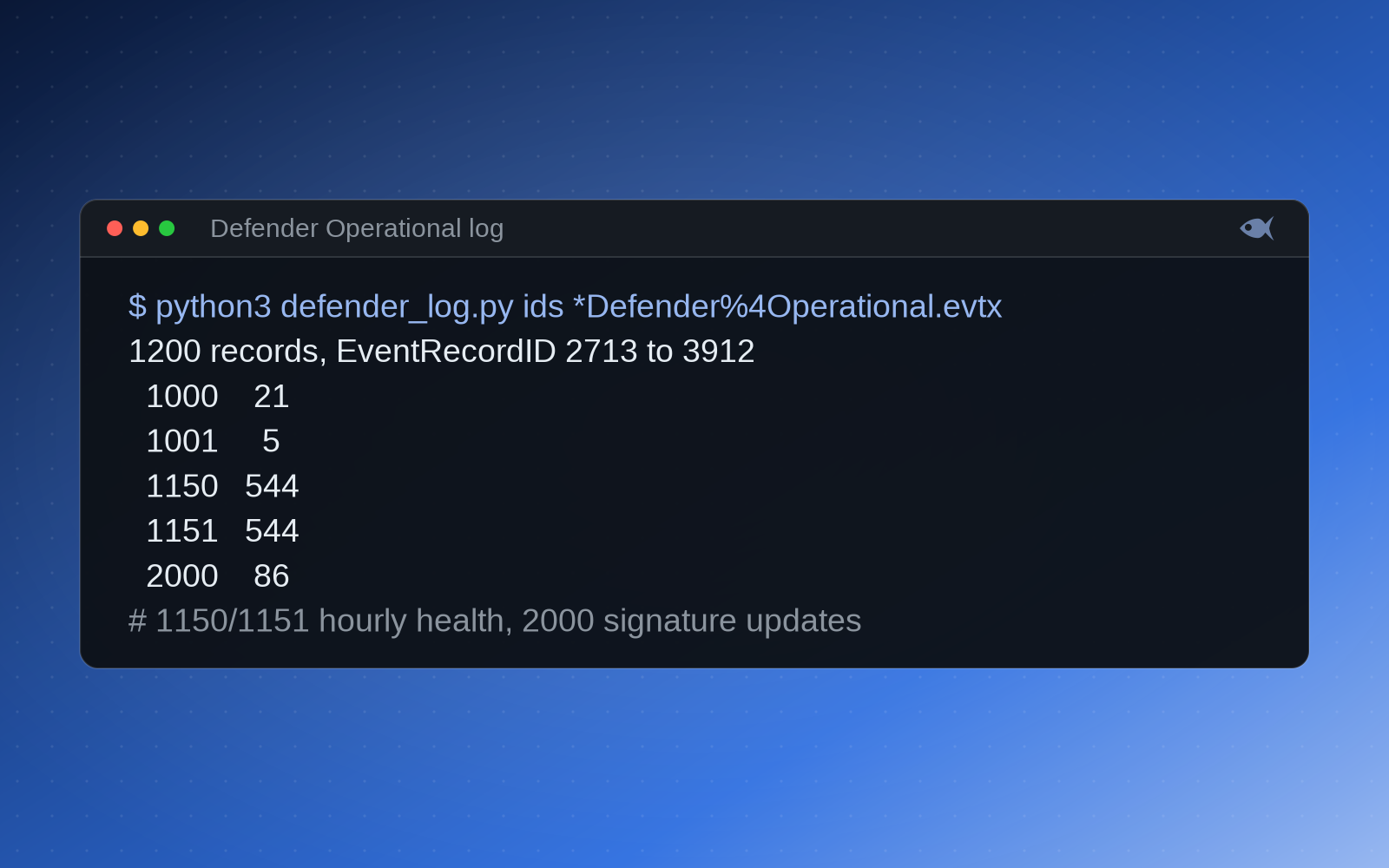
$ python3 defender_log.py ids 'Microsoft-Windows-Windows Defender%4Operational.evtx'
1200 records, EventRecordID 2713 to 3912
oldest 2025-01-23 18:53:59 UTC
  1000    21
  1001     5
  1150   544
  1151   544
2000 86Versions and updates
Each 2000 names the Current and Previous Signature Version, the Update Type (Full or Delta) and the Current and Previous Engine Version, so updates read as a chain. Don't mix up the three versions: platform (4.18.24090.11, Product Version in 2000), engine (1.1.24090.11) and security intelligence (1.422.x.0).
<EventID Qualifiers="">1150</EventID>
<TimeCreated SystemTime="2025-02-03 11:07:24.366163+00:00"></TimeCreated>
<EventRecordID>3277</EventRecordID>
...
<Data Name="Signature version">1.422.270.0</Data>

<EventID Qualifiers="">2000</EventID>
<TimeCreated SystemTime="2025-02-03 11:29:40.075474+00:00"></TimeCreated>
<EventRecordID>3279</EventRecordID>
...
<Data Name="Current Signature Version">1.422.273.0</Data>
<Data Name="Previous Signature Version">1.422.270.0</Data>
<Data Name="Domain">NT AUTHORITY</Data>
<Data Name="User">SYSTEM</Data>
<Data Name="Signature Type Index">1</Data>
<Data Name="Signature Type">%%800</Data>
<Data Name="Update Type Index">2</Data>
<Data Name="Update Type">%%804</Data>
<Data Name="Current Engine Version">1.1.24090.11</Data>A second 2000 follows within a millisecond with Signature Type Index 2, so count updates on one index (43 here). python-evtx prints what's stored, so Signature Type and Update Type show references like %%800 and %%804. Read the Index field beside each.
The 1151 written half a millisecond after each 1150 carries protection states and the last scans:
<EventID Qualifiers="">1151</EventID>
<TimeCreated SystemTime="2025-02-03 11:07:24.366779+00:00"></TimeCreated>
...
<Data Name="AVSignature version">1.422.270.0</Data>
<Data Name="RTP state">%%901</Data>
<Data Name="Last quick scan age">2</Data>
<Data Name="AV signature creation time">2/3/2025 12:50:49 AM</Data>
<Data Name="Last quick scan start time">1/31/2025 5:54:01 PM</Data>
<Data Name="Last quick scan source">2</Data>
<Data Name="Last full scan start time">1/1/1601 12:00:00 AM</Data>
<Data Name="Last full scan source">0</Data>What it proves
What Defender saw and did. A 1116 puts a threat at Path, under Process Name, as User; the 1117 says what Defender did. Whether the file ran is a question for Prefetch, Amcache or 4688. Before you call a host clean, look for a 1013: detection history deleted.
Which definitions it had at a given time. Take the last 2000 before your timestamp. Microsoft Learn lists engine and security intelligence versions by release date. On a full image, the SOFTWARE hive's Microsoft\Windows Defender\Signature Updates key (AVSignatureVersion, EngineVersion, SignaturesLastUpdated) should agree with the last 2000.
That it was running. 1150 comes every hour. A gap means MsMpEng.exe wasn't writing, and the System log says why:
$ python3 defender_log.py gaps 'Microsoft-Windows-Windows Defender%4Operational.evtx'
2025-01-31 20:53:59 -> 23:07:24  2:13:25.142902
$ python3 defender_log.py list System.evtx 1074 6006 6005 | grep 2025-01-31
2025-01-31 21:45:24 1074
2025-01-31 21:45:27 6006
2025-01-31 21:58:09 6005That protection was turned off. Set-MpPreference -DisableRealtimeMonitoring $true is a configuration change: look for a 5007 with the old and new value and a 5001 as real-time protection goes off. A real 5007 cited in the product's notes reads HKLM\SOFTWARE\Microsoft\Windows Defender\Features\Controls\278 = 0x0, a registry path and a DWORD. Microsoft says to review an unexpected 5007 as possible malware. With tamper protection on, the change is blocked and a 5013 names the setting. Take the 5001's second to the Security log's process creations to find who did it.
Traps
- It wraps. The real Windows 10 log the product's notes describe held 1,262 records in 1 MB. Here 1,200 cover about three weeks, so an older detection is gone. Collect it early.
- A 1000 with no 1001 is normal. Only 5 of 21 scan starts here have a 1001, and in that real log 4 of 20 did. A stopped scan writes 1002.
- Signature age counts from the release. Microsoft computes it from the update's release date. AV signature creation time above is 00:50 UTC; this host's 2000 installed that version at 07:40:01.
Reading it
The figures come from a short python-evtx script; its core:
from datetime import datetime, timedelta
import xml.etree.ElementTree as ET
import Evtx.Evtx as evtx

E = "{http://schemas.microsoft.com/win/2004/08/events/event}"

def events(path):
    with evtx.Evtx(path) as log:
        for rec in log.records():
            s = ET.fromstring(rec.xml()).find(E + "System")
            yield (int(s.find(E + "EventRecordID").text), int(s.find(E + "EventID").text),
                   datetime.fromisoformat(s.find(E + "TimeCreated").get("SystemTime")))
On Windows, Get-WinEvent reads a collected file through the Path key:
Get-WinEvent -FilterHashtable @{Path='.\Microsoft-Windows-Windows Defender%4Operational.evtx';
    Id=1116,1117,1013,5001,5007,5010,5012,5013} -Oldest |
    Select-Object TimeCreated, Id, Message
EvtxECmd takes the whole folder (EvtxECmd.exe -d ...\winevt\Logs --csv out); filter the EventId column and read the PayloadData columns.
In the Windows cases
Every Windows host with event logs in Red Herrings 1.18 ships Defender's Operational log beside Security, System, Application and Group Policy's Operational log. Its records follow the host's boots in the System log: the hourly 1150 and 1151, 2000 pairs climbing to the version in the SOFTWARE hive's Signature Updates key, a full update with a 2002 at an engine release, a scan start every 26 hours, and the newest 1,200 records kept. Where someone turns real-time protection off, a 5007 and 5001 follow the command by seconds. Versions follow Microsoft's published release dates, and each student's host, versions and times are their own.
The First Look cases are free, and a 30-day trial adds a medium and a hard case in each discipline. It runs on your machine and generates a different host for every student.